| |
|
|
|
|
|
| |
|
|
SKY Index v7.0 Professional Edition Download Page
Thank you for your purchase of SKY Index Professional v7.0. Below is the information needed to download and install SKY Index Professional Edition v7.0. Do not skip the important notice that follows.
*** IMPORTANT ***
You must save the file you are about to download 'SKYIndexPro7Setup.exe' to a CD or other external media for safe keeping in case you should ever need to reinstall the program in the future. Please save the file before you install the program or you will likely forget to do it.
This download page will NOT remain available to you. You should also save your registration information so that you have it handy should you need to reinstall SKY Index in the future.
| To start the download of SKY Index Professional v7.0, click the button to the right: |
|
Usually you will be taken directly to a Save As dialog but some browsers may ask you to confirm the download. If it does, please confirm the download.
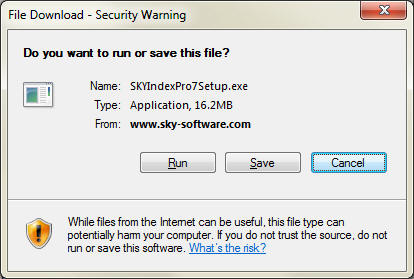
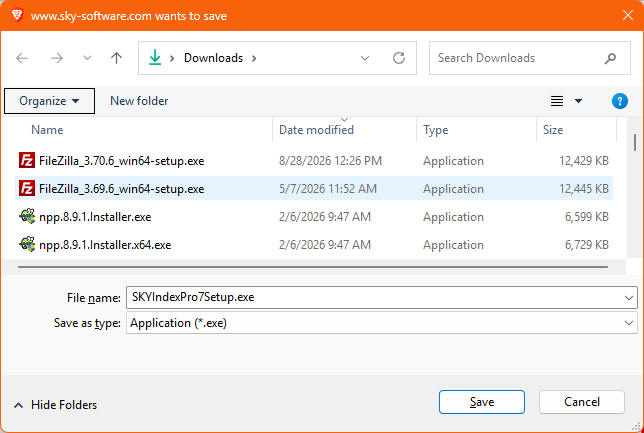
When Save As Dialog appears (similar to the dialog below), we recommend saving in the Downloads directory if that is not already the suggested directory in the Save As dialog. It will be similar to the dialog below. Click Save.
The download process will begin. After the download is complete, you'll usually see a notice at the top of your web browser with an option to Open. Click that option or go to your Downloads folder and double click on the file "SKYIndexPro7Setup.exe". The '.exe' may not be visible.
NOTE: Depending on your browser, you may get a message that tells you that the file is not a commonly downloaded file. In that case, you will have to explicitly tell your browser to keep the file.
Follow the onscreen instructions to complete the installation.
|
||||
|
Copyright ©, SKY Software. All Rights Reserved · Last update:
17 Oct 2026
· Is there a problem with our website? Please report it to: Webmaster · Every effort has been made to ensure accuracy, but we cannot be responsible for misprints. · The SKY Software logo is a registered trademark of SKY Software. · SKY Index is a trademark of SKY Software. · Other products and companies referred to herein are trademarks or registered trademarks of their respective companies or mark holders. |